
Build a source pack others can subscribe to
From a hand-modified extension to a hosted JSON file: writing the sources, choosing placeholders, keeping internal hosts local, serving it with an ETag, and rotating it safely.
Many investigators end up with the same artefact: a list of links, one per internal tool, with the entity spliced into a query string. It lives in a wiki page, a browser bookmarks folder, or a colleague's head. It is always slightly out of date, and it is never the same on two browsers.
A source pack is that list, written down once in a form a browser can subscribe to. This is how to build one.
Start from what you already have
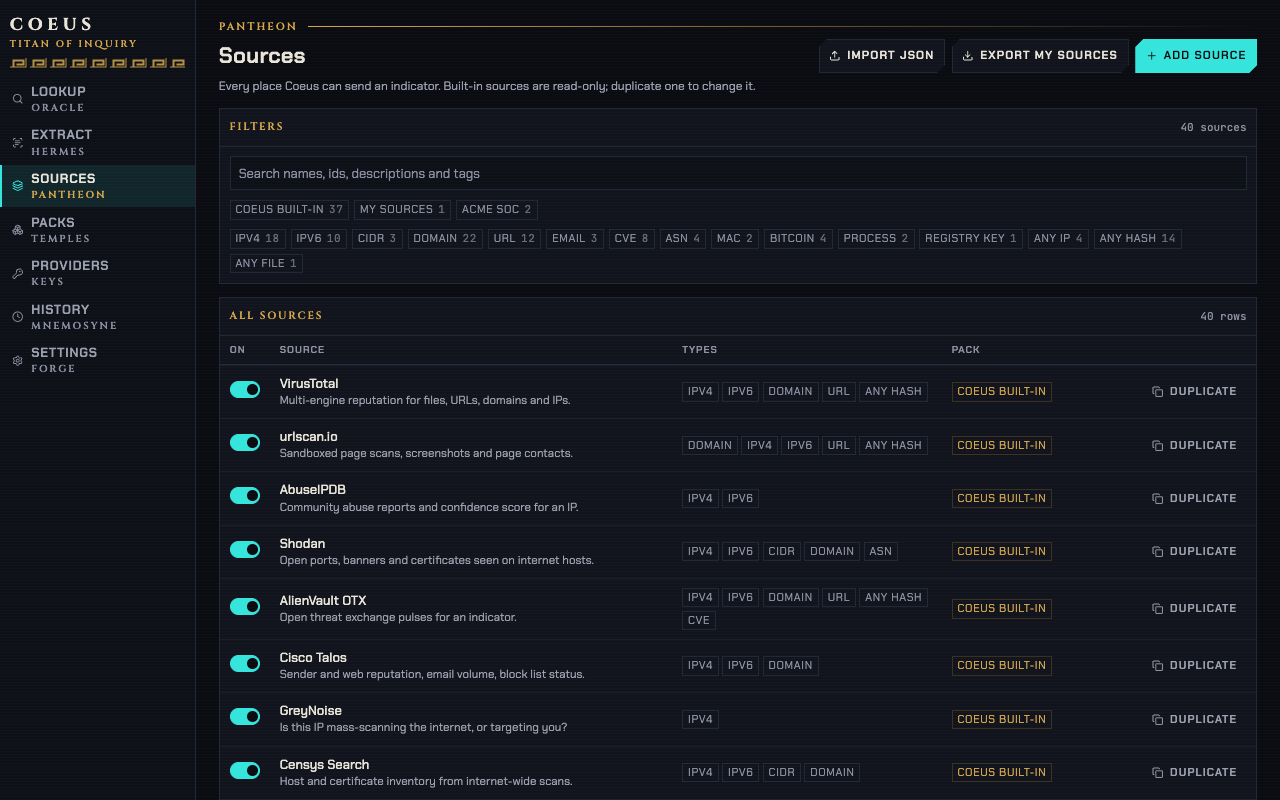
Do not write the file from scratch. Open the Coeus dashboard, add three or four of your internal tools by hand on the Sources page, then use Export My sources. What comes out is a valid pack, and it is the same shape the importer accepts, so the round trip is lossless.
If you are coming from Coeus 1.x, or from a colleague's zip, use Sources → Import JSON
first. It accepts four shapes and works out which it has: a modern pack, a 1.x tools list, a
type map ({"ip": ["…", "…"], "domain": [...]}), or a bare array of source objects. The import
report tells you what it dropped — a url key that is not a known type or group, an entry with
no usable template — before you commit anything.
The file
A pack is an object with four required fields and a list of sources.
{
  "schema": 1,
  "id": "acme-soc",
  "name": "ACME SOC",
  "version": "2026.09",
  "homepage": "https://example.com/soc",
  "sources": [
    {
      "id": "acme-reputation",
      "name": "ACME reputation",
      "desc": "House reputation score for hosts and addresses",
      "tags": ["reputation", "internal"],
      "url": {
        "ip": "https://intel.example.com/reputation?q={ioc}",
        "domain": "https://intel.example.com/reputation?q={ioc}",
        "url": "https://intel.example.com/reputation?q={ioc:noscheme}"
      }
    },
    {
      "id": "acme-case-search",
      "name": "ACME case search",
      "desc": "Past tickets mentioning this entity",
      "tags": ["cases"],
      "auth": true,
      "url": {
        "ip": "https://cases.example.com/search?q={ioc}&type={type}",
        "hash": "https://cases.example.com/search?q={ioc}&type={type}",
        "cve": "https://cases.example.com/search?q={ioc}&type={type}"
      }
    }
  ]
}
schema is always 1. id is kebab-case and has to be unique across the packs a person has
installed, because it is what a subscription is keyed on. version is a string you choose;
2026.09 reads better in the Packs list than a git hash.
Inside a source, id must be unique within the pack, name is what appears in the right-click
menu, and url needs at least one entry. auth: true puts a lock badge next to the source and
means "this site will ask you to log in" — it is a heads-up, not a credential store. Coeus never
holds credentials for a link source.
Choosing the url keys
A key is either a type id or a group id, and the concrete type always wins over its group.
The groups are ip (ipv4, ipv6, cidr), hash (md5, sha1, sha256) and file
(process, filepath). Everything else — domain, url, email, cve, asn, mac, btc,
registry — stands alone.
That precedence is the feature. A malware repository that has a real page for SHA-256 and only a search box for the shorter digests is written as:
"url": {
  "sha256": "https://example.com/sample/{ioc}",
  "hash": "https://example.com/search?q={ioc}"
}
An MD5 falls through to the search; a SHA-256 goes straight to the sample page.
Choosing the placeholder
{ioc} URL-encodes the value and is the right answer nine times out of ten. The others exist
for tools that want something else:
| Placeholder | Use it when |
|---|---|
{ioc} | Anything in a query string. The default. |
{ioc:raw} | The tool sits behind a path segment and encoding breaks routing. |
{ioc:noscheme} | The tool wants a URL without http://, and encodes it itself. |
{ioc:b64} | base64url without padding — the VirusTotal URL id form. |
{ioc:urlscan} | An Elasticsearch query string, where : and / need escaping. |
{ioc:defanged} | An internal system that stores entities bracketed. |
{domain} | You have a URL or an email but the tool takes a hostname. |
{type} | One endpoint that dispatches on the type it was given. |
The 1.x forms %s, %r and %urlscan still work byte for byte, so an old list keeps
functioning after an import. Prefer the brace forms in anything new: %s does not encode, so a
value with an & or a space in it silently truncates the URL you meant to build. Every rule,
with a worked example per placeholder, is in the placeholder reference,
which renders them live against a value you type.
Keep internal hosts local when you need to
Some hostnames should not be in a file at all. Mark a source you added yourself localOnly and
it stays in chrome.storage.local in that browser: it is excluded from browser sync
storage and from Export My sources, so it can never end up in a pack you publish by
accident.
Hosting it
Serve the file over HTTPS with Content-Type: application/json. That is the only hard
requirement. An internal web server, a repository's raw file endpoint, an S3 bucket behind SSO
— all fine, as long as every intended browser can reach it.
Send an ETag if you can. Coeus refetches on the schedule in Settings with If-None-Match, so
a pack that has not changed costs one 304 and no body. If the fetch fails, the previous copy
stays in use and the Packs page shows the error; nobody's menu empties because a server was
rebooting.
The first time someone adds the URL, Chrome asks for permission to read that one origin. Declining means the subscription is not added — there is no partial state.
In the earlier website plan, the account would host it: publish a
pack there and it is served at /p/<slug>.json with the same ETag behaviour.
Rotating it
Three habits keep a shared pack calm:
Change ids only when you mean to
A source's id is its identity. Renaming acme-siem to acme-siem-v2 reads as "one source
removed, one added" to everyone subscribed. Change name and desc freely; change id
deliberately.
Bump version on every publish
Nothing enforces it, but the Packs page shows it, and "everyone is on 2026.09 except one laptop" is a five-second diagnosis instead of a twenty-minute one.
Test the template before you ship it
Paste a real entity into the "Try it" input on the source form. It renders the URL exactly
as the launcher will. A %s where you meant {ioc} is invisible until someone looks up a URL
with an ampersand in it.
Once the file is up, onboarding is one paste. The new investigator installs Coeus from the store, opens Packs, adds the URL, approves the origin, and their right-click menu matches everyone else's — including the ordering, which follows the pack.