
Where your API keys live
Local storage, never sync; site access without a proxy; the queue, quotas, private ranges, and exactly what the account can and cannot see.
Update, 6 November 2026. Coeus no longer has accounts; everything it keeps is stored in your browser.
An extension that asks for your VirusTotal key is asking for something real. A free community key is not a secret worth a lot of money, but it is attributable: everything requested with it is attributable to you, and a leaked key is a small permanent embarrassment. "We store it securely" is not an answer. Here is where it actually goes.
storage.local, and nowhere else
Chrome gives an extension three storage areas, and the difference matters.
| Area | Where it goes | What Coeus puts there |
|---|---|---|
sync | Uploaded to your Google account, your browsers | Settings, your non-local sources, subscriptions, source overrides, the page-scan allowlist |
local | This browser profile | API keys, cached packs, cached verdicts, quotas, History, usage counters |
session | Memory, cleared when the browser closes | The current page scan, keep-awake state |
API keys are in local. They are never written to sync, so they never touch a Google
account, and never appear in your other browsers even though your settings do. If you use Coeus
at work and at home, you type each key twice. That is deliberate.
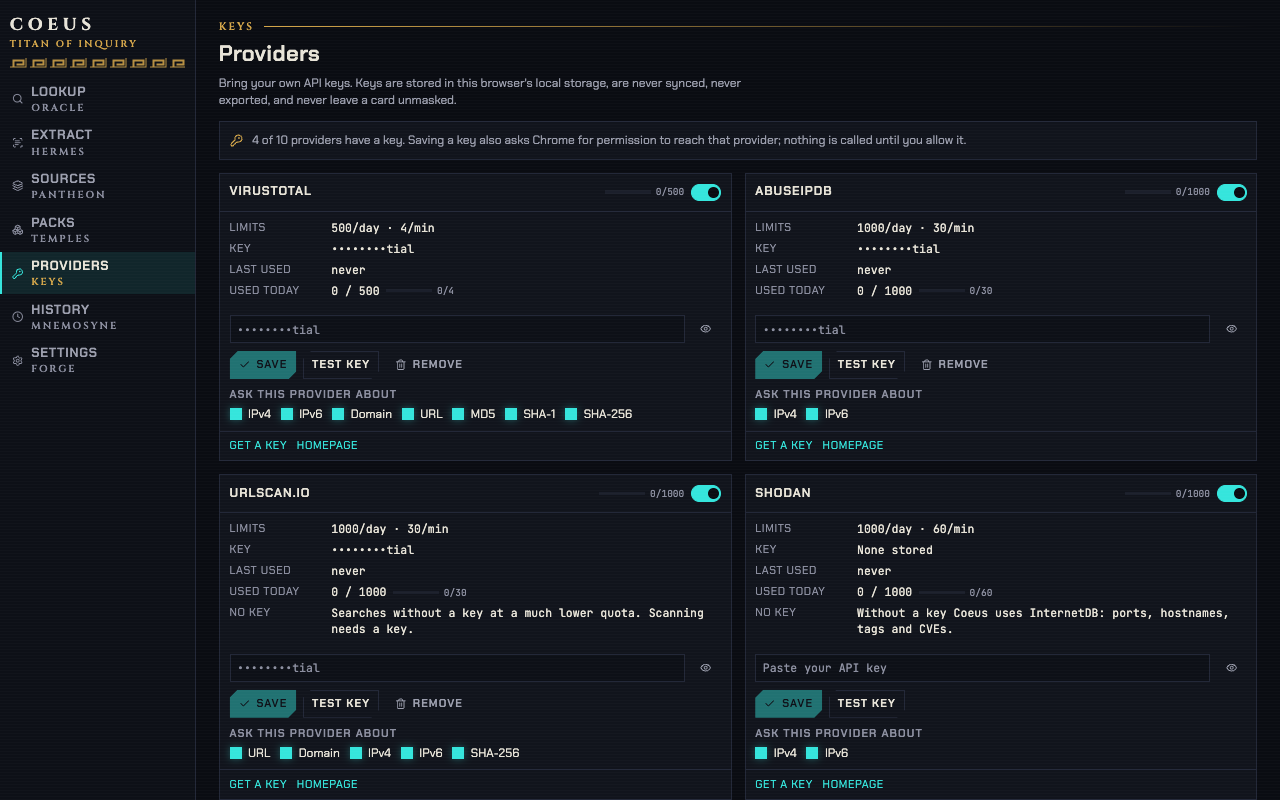
They are also excluded from Export My sources and from every other export the extension can produce, and they are masked in the interface after they are saved — the API keys page shows that a key exists and when it was last used, not what it is.
The stored record per provider is small and boring:
providerKeys: Record<
  ProviderId,
  {
    key: string;
    addedAt: number;
    lastUsedAt?: number;
    lastStatus?: "ok" | "invalid" | "limited";
  }
>;
lastStatus is what lets the API keys page say "VirusTotal rejected this key" instead of
failing silently in the background six weeks after you rotated it.
The key is the secret, not the host
Coeus's manifest declares host_permissions for every site, granted at install — the same
access 1.x asked for, and what a tool that reads whatever page you are on has to have. So
reaching a source's API needs no second prompt.
That is a question about hosts, and it is the less interesting one. The question that matters
for a key is where the key lives, and the answer is unchanged by any of it: chrome.storage.local
in this browser, sent to its own source and nowhere else, never to us, never into sync, never
into an export.
Chrome's extension details page shows that broad grant and lets you change it to On click without uninstalling anything. Under that setting, the existing per-origin request path becomes the fallback when you enable a source.
Adapters run in the service worker with that origin granted, so there is no CORS proxy anywhere in the design — and therefore no third party in the request path. The key goes from your browser to the source that issued it. Nothing else sees it.
What actually leaves, and when
Nothing at all happens until you act. Coeus makes no request of its own: no remote configuration, and nothing that carries what you looked up. Anonymous usage counts — which features are used, in ranges — go to a first-party collector unless you switch them off in Settings, and a daily version check asks this site whether a newer build exists. Beyond those two, the only outbound traffic is
- an opened source, which is a tab you asked to open;
- an API source call, which needs a key you added for a type it answers;
- a pack refresh, to a URL you subscribed to, on the schedule you set.
Private and reserved ranges never reach an external source. RFC 1918, loopback, link-local, CGNAT
(100.64/10), 0.0.0.0/8, multicast and broadcast, plus IPv6 ::1, fc00::/7 and
fe80::/10, are filtered before any adapter is called. This is not a setting. The
queryPrivateIps option only decides whether a link source may be opened for such an address;
the API-source path is closed either way.
The queue exists to protect your quota
Every adapter declares its free-tier limits, verified against the source's documentation with
the date recorded in the adapter's own source. A token bucket per source enforces the
per-minute figure, and a daily counter persisted in local.quota enforces the per-day one.
quota: Record<
  ProviderId,
  {
    day: "YYYY-MM-DD";
    count: number;
    minuteWindowStart: number;
    minuteCount: number;
  }
>;
When the minute bucket is empty the call waits. When the day is exhausted the adapter is not
called at all: it returns a verdict carrying error: "rateLimited", which is why the side panel
can say the day is spent rather than showing a spinner that never resolves. Four requests a
minute on the VirusTotal free tier disappears fast during an incident, and a queue that quietly
burns the day's allowance on retries is worse than no queue.
Results are cached under provider|type|value for an hour by default, so re-checking the same
address twenty minutes later costs nothing. The cache holds 2,000 entries and evicts the oldest
by fetch time; it lives in local alongside the keys, and clearing the extension's data clears
it.
What the account can see
Signing in is optional, and the split is the point of the whole design: the website never stores or proxies an API key. There is no API-keys table in the schema. There is no endpoint that accepts one.
When a signed-in browser is present, the account asks the extension to trace, over Chrome's
externally_connectable message channel, and receives verdict summaries back. The extension
makes the source call locally with the local key; the account is handed the result.
What the account stores, if you sign in, is what you put in it: your account email, the cases
you create, the packs you publish, and the history you choose to sync. What syncs is per record
and listed in the sync doc. Sources marked localOnly are dropped on the way in
and on the way out, so an internal hostname cannot travel even if a peer sends one.
If you want to check
Nothing above requires trust. Three ways to verify it yourself:
Read the manifest
chrome://extensions → Details. The site-access list is what you approved and nothing else.
A source you have not given a key to has no origin in that list at all, so the extension
cannot reach it even if it wanted to.
Watch the network
Open the service worker's DevTools from the extensions page and look at the Network tab during a trace. Every request is to a source you added a key for.
Export everything
Export My sources produces the pack you would publish. No key appears in it, because the
export reads userSources, which is a different storage key from providerKeys.
The source-by-source detail — which endpoint, which header, what the adapter reads — is in the API keys doc, and the reasoning behind the permission model is in privacy design.